
- Published on
How AI Automates Feedback Prioritization
- Authors

- Name
- Gabriel P.
- @gabriel__xyz
How AI Automates Feedback Prioritization
AI is transforming how product teams handle user feedback, saving time and improving decision-making. Instead of manually sifting through scattered feedback from support tickets, app reviews, surveys, and more, AI uses tools like Natural Language Processing (NLP) to analyze, group, and prioritize feedback based on business impact. This approach reduces bias, speeds up processes, and ensures roadmaps reflect actual customer needs - not just the loudest opinions.
Key Takeaways:
- Time Savings: AI cuts manual feedback sorting from 40–80 hours per quarter to minutes.
- Improved Decisions: Feedback is ranked using models like RICE or ARR weighting for data-driven prioritization.
- Higher Engagement: Transparent tools like Features.Vote show users their feedback matters, reducing churn and boosting retention.
AI Feedback Prioritization: Core Concepts
Key Concepts: Feedback Ingestion, NLP, and Prioritization Models
To build an effective AI-powered workflow, it’s important to understand the main components that make it all come together.
Feedback ingestion refers to gathering feedback from various sources - like support tickets, app reviews, surveys, or sales calls - and centralizing it in one place. Without this step, AI won’t have the necessary data to analyze.
AI uses NLP-powered deduplication to process this feedback. By analyzing context and grouping similar inputs, NLP ensures the data is clear and manageable [8].
Then, there are prioritization models, which help AI rank feedback based on importance. Here are three widely used frameworks:
| Framework | How It Works | Best For |
|---|---|---|
| RICE | Evaluates Reach, Impact, Confidence, and Effort | Teams that rely on data-driven decisions [1] |
| MoSCoW | Categorizes features into Must, Should, Could, and Won’t | Planning sprints and making trade-offs [1] |
| Weighted Voting | Assigns votes based on factors like customer tier or revenue | B2B SaaS teams with high-value accounts [1][5] |
For instance, in a weighted voting model, feedback from an enterprise customer might carry five times the weight of a free user’s input. This approach ensures that decisions align with business priorities, especially when revenue impact is at stake [8].
By combining these models with AI, teams can rank feedback systematically, paving the way for automation.
Why Manual Feedback Prioritization Falls Short
Manual feedback processes often fall victim to bias. Teams tend to focus on either the loudest voices or the most recent feedback - a pattern known as the HiPPO problem, where decisions lean toward the Highest Paid Person's Opinion instead of objective user data [5][7]. Additionally, feedback is usually scattered across platforms like Slack, email, CRM notes, and support tickets, making it nearly impossible to compare inputs consistently [7][11].
Manual prioritization is also painfully slow. Feedback often gets stuck in the "Under Review" phase for so long that users lose faith in the process [1][4]. AI solves these issues by centralizing feedback, using NLP to merge similar requests, and applying objective models to rank what matters most [8][7].
Modern tools make this process even easier by integrating intelligent feedback management, as the next section highlights.
Features.Vote: A Platform for Feedback Management
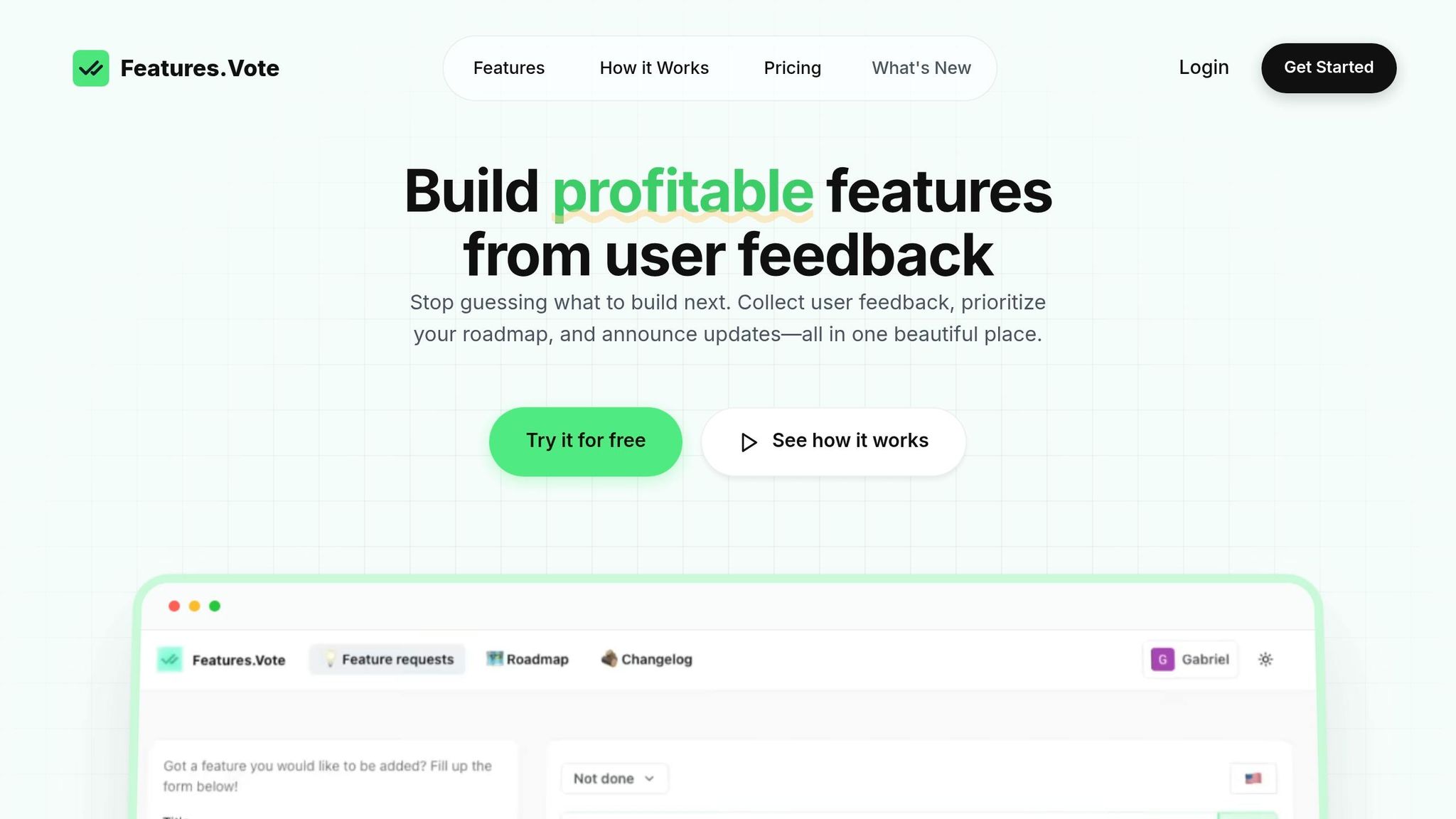
Solving the challenges of feedback prioritization often requires a specialized tool. Features.Vote is one such platform, designed to help product teams organize and act on user feedback without the hassle of manual processes. It offers a public voting board where users can submit and upvote feature requests, turning scattered feedback into a structured backlog.
The platform also provides public roadmaps and a changelog, creating transparency by showing users which features have been built. This transparency matters: users who see their suggestions implemented are three times less likely to cancel their subscriptions [4]. Additionally, teams that notify users when their requested features are launched see a 40%+ boost in repeat feedback submissions [4].
"My previous feature request form was connected to Google Sheets to track feature requests. FeaturesVote simplifies feature suggestion and voting for users and me." - Jijo Jose, Founder, LaurelDesignerPro [9][5]
Features.Vote also integrates AI tools to automatically analyze and prioritize feedback. For teams ready to leverage AI, the Growth plan (29/month) unlocks API access and MCP server integration, enabling connections to AI assistants like [Claude](https://platform.claude.com/docs/en/get-started) for managing requests and generating changelogs with natural language commands [\[12\]](https://github.com/features-vote/features-vote-mcp)[\[10\]](https://features.vote/docs/api). For smaller teams or solo founders, the **Basic plan** starts at 9/month and includes a public voting board, roadmap, and email notifications [9].
sbb-itb-87ea67c
How to Prepare Your Feedback Data for AI Analysis
Centralizing Feedback from Multiple Channels
Bringing all your feedback together in one place is the first step. Feedback often comes from a variety of sources like Zendesk, Slack, CRM systems, app store reviews, and email surveys. Without a unified view, AI can't effectively analyze or prioritize the data.
The goal is to create a single, unified dataset. Start by identifying all your feedback channels and integrating them into one system. Then, standardize the intake process - each feedback entry should include key details like a summary of the request, the customer problem it addresses, the relevant product area, and the channel it came from. This consistency is what makes the data ready for AI analysis [13][14].
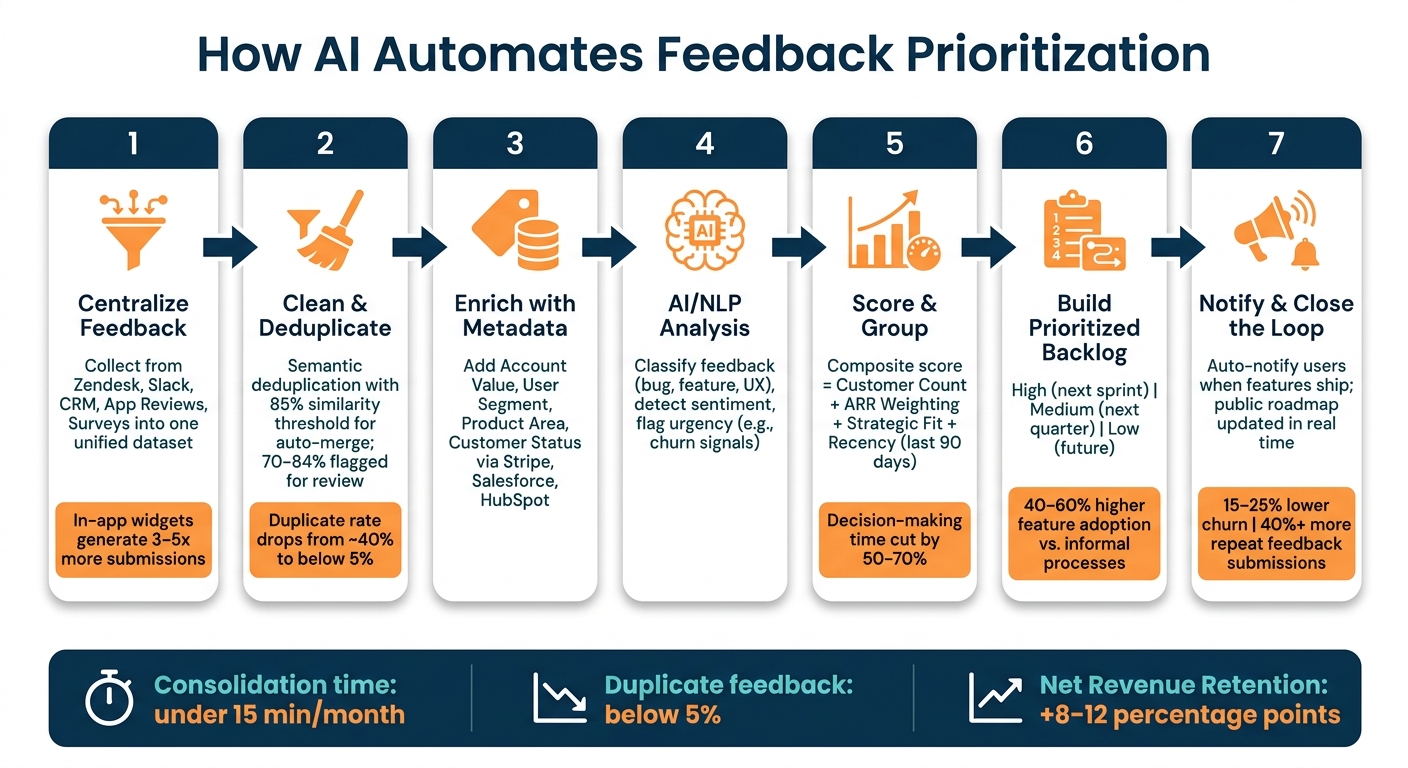
Here’s a practical tip: use in-app feedback widgets instead of standalone forms. These widgets tend to generate 3–5x more submissions because users can provide feedback right when they encounter an issue. Tools like Features.Vote offer embeddable widgets that automatically feed data into a centralized voting board, simplifying the process from the beginning [5].
"AI needs clean, consolidated data - The multi-agent system only works because our data team has done the hard work of bringing data together from disparate sources." - Shiva Mogili, Director of Product Management, Fivetran [15]
Once your dataset is centralized, the next step is refining it to ensure it's both clean and secure for AI processing.
Cleaning Data and Protecting User Privacy
After centralizing your feedback, you need to clean it up by removing duplicates and protecting sensitive user information. Raw feedback often contains repeated entries, vague descriptions, and personally identifiable information (PII), all of which can interfere with AI's performance.
Start with semantic deduplication. Use AI tools to identify and merge requests that describe the same need. For example, set an 85% similarity threshold for automatic merging and flag entries with 70–84% similarity for manual review. Without this step, AI may focus on redundant data instead of understanding broader customer demand [2].
On the privacy side, it's crucial to have a redaction process in place before feedback reaches the AI layer. This means removing names, email addresses, and other PII during the data ingestion process. For businesses handling enterprise customer feedback, this step is especially important to comply with US data privacy regulations and contractual obligations [16]. A weekly review - every five business days - allows your team to catch any sensitive data that automated systems might miss [17].
Adding Metadata to Feedback
Once your data is clean, enriching it with metadata adds essential context that helps AI prioritize feedback more effectively. Metadata is the key to moving from basic analysis to actionable insights, as it provides the business context needed for smarter decision-making.
Some of the most critical metadata fields to include are:
- Account Value: Monthly or annual subscription amounts in USD
- User Segment: Categories like Free, Paid, or Enterprise users
- Product Area: Specific parts of your product, like Billing or API
- Customer Status: Whether the user is Active, Churned, or a Prospect
Why does metadata matter so much? It allows AI to calculate a composite priority score instead of just tallying votes. For example, a feature requested by three enterprise customers paying $10,000/year each should carry more weight than a similar request from 50 free users [2].
| Metadata Type | Example Values | Why It Matters |
|---|---|---|
| Account Value | 10,000/year | Helps prioritize based on revenue impact [1][2] |
| User Segment | Enterprise, Trial, Power User | Highlights trends in key customer groups [1][11] |
| Product Area | Billing, API, Mobile App | Directs feedback to the right team [1][6] |
| Customer Status | Active, Churned, Prospect | Differentiates between retention and acquisition needs [2] |
To streamline this process, connect your feedback system to tools like Stripe, Chargebee, Salesforce, or HubSpot. These integrations allow account values and other metadata to flow in automatically, eliminating the need for manual input, which doesn’t scale [2]. With consistent metadata in place, your AI can prioritize feedback based on what drives the most business impact, not just the number of requests.
How to Use AI to Turn Customer Feedback Into a Product Roadmap in 30 Minutes
::: @iframe https://www.youtube.com/embed/rHBmk71rJPw :::
How to Build an AI Workflow for Feedback Prioritization
Once your feedback data has been centralized, cleaned, and enriched with metadata, the next step is to use AI to make sense of it. This is where the magic happens - turning raw feedback into actionable insights.
Using AI Tools to Analyze Feedback
Natural Language Processing (NLP) comes into play here, helping to analyze unstructured feedback from various sources. By processing textual data, NLP can classify feedback into categories like bug reports, feature requests, or UX complaints. It also identifies urgency based on key phrases and context. For example, a comment like "we’ll churn if this isn’t fixed" would be flagged as more urgent than a casual suggestion for a minor tweak.
Sentiment analysis adds another layer, distinguishing frustrated users from those offering neutral or positive suggestions. The result? A structured dataset where each piece of feedback is tagged with a category, sentiment score, and urgency level. This organization transforms scattered feedback into something you can actually work with.
Grouping and Scoring Feedback
Once classified, similar feedback items are automatically grouped using similarity thresholds. This ensures that related requests are consolidated, making it easier to see which issues or ideas have the most traction. For instance, a single request with 30 votes is more actionable than ten separate requests with just three votes each [6].
AI assigns a composite score to each feedback item, factoring in:
- Customer count: The number of unique users who submitted the request.
- ARR weighting: The Annual Recurring Revenue (ARR) of the accounts that made the request.
- Strategic fit: A multiplier based on how closely the request aligns with your current roadmap.
- Recency: Feedback submitted in the last 90 days gets more weight.
"ARR weighting provides a more accurate signal about revenue impact than raw request volume." - Garrett Mullins, SaaS Operations Strategist, US Tech Automations [2]
By using ARR-weighted automation, some teams have cut their decision-making time for feature investments by 50–70% [2]. These insights can be seamlessly integrated into your feedback management system, saving time and streamlining your workflow.
Connecting AI Insights to Features.Vote
Once feedback has been grouped and scored, the next step is to integrate these AI-driven insights into your system, creating a prioritized backlog. Features.Vote's MCP (Model Context Protocol) server makes this process smooth by allowing AI assistants to update feedback boards using natural language commands. This eliminates the need for manual data entry.
The integration covers the entire feedback pipeline:
- Consolidate duplicate requests: The
merge_featurestool combines similar feedback and consolidates votes into a single entry. - Apply category tags: The
update_featuretool assigns tags like "Enterprise", "UI", or "High Priority" to keep boards organized. - Store sentiment and impact scores: Use the
create_commenttool with theis_internalflag to save these insights as internal notes, keeping public boards clean while preserving context for your team. - Update roadmap status: When a feature's priority score reaches a certain threshold, the
update_feature_statustool moves it to "Planned" and notifies all subscribers who voted for it. - Generate changelogs: Use the
generate_changelogtool to create updates based on changes.
| AI Task | Features.Vote MCP Tool |
|---|---|
| Consolidate duplicate requests | merge_features |
| Apply category tags | update_feature |
| Store sentiment/impact scores | create_comment (internal) |
| Update roadmap status | update_feature_status |
| Generate changelogs | generate_changelog |
API access for these tools is available on Features.Vote's Growth and Pro plans, with a rate limit of 100 requests per minute. This provides more than enough capacity for most teams running weekly triage cycles [10].
Turning AI Insights into a Prioritized Product Backlog
With AI-scored feedback in Features.Vote, you can transform raw scores into a well-organized, actionable product backlog.
Setting Priority Bands for Your Backlog
A straightforward way to prioritize is by grouping feedback into three categories - High, Medium, and Low - based on AI-detected demand and strategic alignment. Each band should tie directly to a roadmap timeline, ensuring a clear path from insights to delivery.
| Priority Band | Criteria | Roadmap Timeline |
|---|---|---|
| High | High vote count + strong ARR weight + strategic fit | Next sprint |
| Medium | Moderate demand + partial strategic alignment | Next quarter |
| Low | Low volume + weak revenue signal | Future consideration |
To refine this process further, segment feedback by customer profiles. For example, consider account value or customer type (e.g., Enterprise vs. SMB, or new vs. long-standing accounts). This ensures your priorities align with the segments that are most critical to your growth strategy. By focusing on high-value enterprise insights, you can guide your roadmap toward impactful results.
Interestingly, SaaS teams using structured, automated feature prioritization pipelines like this are able to deliver features that customers actually use at 40–60% higher rates compared to teams relying on informal processes [2].
Once priorities are set, the next challenge is effectively communicating them to all stakeholders.
Using Features.Vote to Share Priorities with Stakeholders
Defining priorities is only half the battle - sharing them effectively is just as important. Features.Vote simplifies this with its public roadmap, which organizes feedback into four clear statuses: Under Review, Planned, In Progress, and Shipped. This real-time visibility keeps both internal teams and users informed, eliminating the need for constant status updates [1][6].
The platform also includes an automated notification system that boosts user engagement. When a feature moves to "Shipped", every user who voted for it gets an email update. This small gesture has a big impact - customers receiving these updates churn at 15–25% lower rates, and teams see a 40%+ increase in repeat feedback submissions [4]. For features that won’t be developed, using the "Declined" status with a brief explanation helps maintain trust and reduces duplicate requests.
But communication isn’t the end of the journey - continuous improvement is essential for keeping your backlog effective.
Refining the Process Over Time
Structured prioritization is just the starting point. To ensure your backlog remains aligned with both user needs and business goals, regular refinement is key. One critical metric to monitor is the Feature Adoption Rate - the percentage of users actively using a feature after it launches. If high-scoring features show low adoption, it’s time to revisit your scoring criteria [1].
Incorporate post-launch data, such as adoption rates and support ticket trends, to fine-tune your model's accuracy. While AI provides an initial direction, real-world results validate whether those predictions were correct. As McKinsey highlights:
"The impact is clear. AI moves product management from an art based on gut feelings to a science grounded in objective, scalable data analysis." [3]
Dedicate 15–20 minutes weekly to review AI-generated clusters alongside qualitative insights from sales calls or user interviews [6][18]. This human-in-the-loop approach helps catch edge cases and ensures your backlog stays rooted in both data and real-world context. Over time, this feedback loop separates teams that build impactful features from those that just build quickly.
Conclusion: Building Better Products with AI-Powered Feedback Prioritization
Switching from manual, intuition-based prioritization to an AI-driven workflow isn't just about saving time - it's about transforming how product teams make decisions. By centralizing feedback, automating deduplication, scoring requests based on ARR, and keeping users in the loop, decisions are anchored in evidence rather than opinions.
The results speak for themselves. Automation reduces consolidation time to under 15 minutes per month, duplicate feedback rates drop from around 40% to below 5%, and SaaS companies with structured feedback systems see Net Revenue Retention rates climb 8–12 percentage points higher compared to those without [2]. These aren't minor improvements - they directly impact product quality and customer loyalty.
A major reason this approach works is the feedback loop it creates. When users witness their suggestions progress from "Under Review" to "Shipped", they feel heard and stay engaged. As Features.Vote explains:
"Users who see their feedback acted on are 3x less likely to cancel. They feel invested in the product because it evolves based on their input." [4]
Platforms like Features.Vote make this process seamless, offering tools like embedded voting boards, public roadmaps, and automated notifications - all without requiring heavy engineering effort. And with pricing starting at just $9/month, it's an accessible option for teams looking to improve retention and refine their roadmaps [1].
Ultimately, the teams that build products users truly love aren't necessarily the ones with the most resources or fastest developers - they're the ones who listen consistently and act on what they learn.
FAQs
::: faq
What’s the minimum data I need to start AI prioritization?
To kick off AI-driven prioritization, the first step is to centralize all your feedback into a single, dependable system. Start by collecting input from essential channels such as support tickets, sales notes, and in-app requests. This helps you spot recurring themes and weed out duplicate entries.
You’ll want to focus on three primary data types: qualitative feedback (insights into what users need), quantitative metrics (data on user behavior), and behavioral signals (patterns in how your product is used). To refine your prioritization further, layer in business context like annual recurring revenue (ARR) or the value of specific customer segments. This added perspective ensures your decisions align with broader business goals. :::
::: faq
How do I keep PII out of AI while analyzing feedback?
When using AI tools, it's crucial to protect privacy by ensuring that personally identifiable information (PII) is removed before processing any data. This means stripping out details like names, email addresses, phone numbers, and unique identifiers from the feedback.
To make this process easier, tools like Features.Vote can help. They streamline the organization and cleaning of feedback through a structured pipeline. By focusing on the content itself - such as sentiment and tags - and normalizing the data to exclude PII, you can maintain user privacy without compromising the quality of your analysis. :::
::: faq
How should I choose between RICE, MoSCoW, and ARR-weighted scoring?
Go with RICE when you’re juggling 10+ competing requests and need objective, numerical rankings (like during quarterly planning). It’s perfect for prioritizing at scale.
Pick MoSCoW when you need quick, categorical decisions - ideal for sprint scoping or when hashing out priorities during negotiations.
Use ARR-weighted scoring if your focus is on tying outcomes directly to revenue or specific business goals.
Many teams actually mix and match these methods. For instance, they might use RICE to create an initial ranking and then apply MoSCoW to finalize what makes it into a release. :::