
- Published on
Feature Voting Best Practices 2026
- Authors

- Name
- Gabriel P.
- @gabriel__xyz
Feature Voting Best Practices 2026
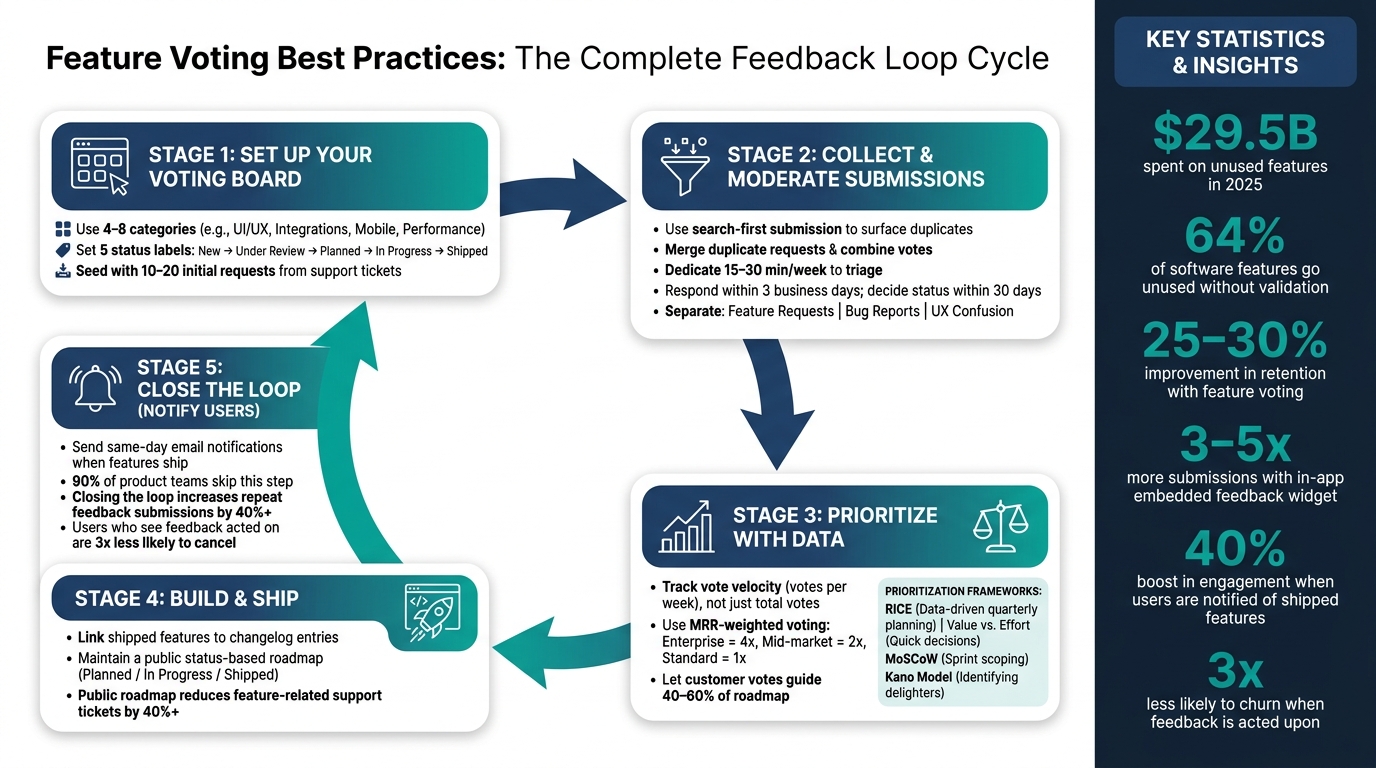
Feature voting helps businesses prioritize product features based on actual user demand. It replaces guesswork with direct user input, reducing wasted resources and improving customer satisfaction. In 2025, SaaS companies spent $29.5 billion on unused features, and 64% of software features went unused without proper validation. Feature voting addresses this by identifying what users truly need, improving retention rates by 25–30%, and reducing churn when users see their feedback implemented.
Key Best Practices:
- Set Up a Clear Voting System: Organize boards with 4–8 categories and 5 status labels like New, Under Review, Planned, In Progress, and Shipped.
- Prevent Duplicates: Use search-first submissions and consolidate similar requests to avoid fragmented data.
- Prioritize Effectively: Combine user votes with business factors like revenue impact and vote velocity (new votes per week).
- Close the Loop: Notify users when features ship to boost engagement by 40% and reduce churn.
Feature voting works best when integrated into a broader feedback system, alongside tools like surveys, interviews, and analytics. Platforms like Features.Vote simplify this process with public roadmaps, voting boards, and automated notifications, starting at $9/month. By listening to users and acting on their input, businesses can build better products and foster trust.
Setting Up a Feature Voting System
Structuring Your Voting Board
A clear and organized voting board gets users involved right away. The aim is to make it easy for users to know what to submit, where to find similar ideas, and how to track the progress of their requests.
Stick to 4–8 categories, such as UI/UX, Integrations, Mobile, and Performance. Fewer categories can make everything feel jumbled, while too many may confuse users and slow them down. Similarly, limit status labels to five, like New, Under Review, Planned, In Progress, and Shipped. This keeps things simple and avoids overwhelming users.
To kick things off, add 10–20 initial requests pulled from support tickets or sales calls. This shows users that the board is active and encourages participation. A well-organized board creates the foundation for effective submissions and voting.
Handling Submissions and Duplicates
Duplicate submissions are bound to happen, and managing them is crucial. If duplicates pile up, vote counts can get fragmented, making it harder to gauge demand. For example, one request with 30 votes is much more impactful than five similar requests with just a handful of votes each.
The best way to address this is with a search-first submission process. As users type their ideas, surface similar existing requests to encourage them to vote on those instead of creating duplicates. Inevitably, some duplicates will slip through. When that happens, merge them into a single, well-written post and combine the votes.
Mercury, a fintech company, found this approach invaluable. By consolidating feedback, they uncovered trends across 20–30 users that had previously been buried in internal discussions, helping them make data-driven roadmap decisions:
"The voting has been super helpful too. This is something that's not just the support agent experiencing this, but we've seen it across 20 or 30 people." - Ida Ström, Senior Product Designer, Mercury [9]
To keep the board manageable, set aside 15–20 minutes each week to review new submissions, merge duplicates, and archive requests that have been inactive for over six months. A stale or cluttered board can discourage users just as much as an empty one.
Setting Voting Rules and Limits
How users vote directly impacts the quality of feedback you receive. A simple upvoting system - one vote per user per idea - is easy to implement and works well for most products. If you need more detailed insights, consider a points allocation system, where users are given a set number of points (e.g., 10) to distribute among ideas. This adds a layer of prioritization but requires slightly more effort from users.
For B2B SaaS companies, revenue-weighted voting can be a game-changer. Prioritizing votes from enterprise customers over free-tier users ensures your roadmap aligns with business goals, not just popularity.
When it comes to authentication, requiring full account creation before voting can reduce feedback volume by 3–5x [1]. To strike a balance, consider using SSO or email-only verification. This keeps the process simple while tying votes to real users, which helps prevent abuse and accurately apply revenue weighting.
| Voting System | Best For | Trade-off |
|---|---|---|
| Simple Upvoting | Startups, small SaaS | No prioritization signal |
| Points Allocation | Enterprise, technical users | Higher cognitive effort |
| Weighted Voting | B2B SaaS with tiered plans | More complex setup |
sbb-itb-87ea67c
Moderation and Triage: Keeping Your Board Reliable
Reviewing and Approving Submissions
The strength of your board lies in the quality of its submissions. Regular moderation ensures that vague, duplicate, or off-topic entries don’t dilute its value.
A great way to stay on top of this is by setting aside 15–30 minutes each week to review new submissions. Use this time to normalize titles, clarify the scope of requests, and assign an initial status like Under Review. For mid-size companies, a good rule of thumb is to acknowledge new requests within 3 business days and decide on their status within 30 days [10].
Encourage users to include a clear problem statement in their submissions. A simple title often doesn’t tell the full story. For example, a request titled "Add CSV export" might actually stem from the need to share data with clients. Understanding the underlying problem opens the door to multiple solutions [10][5].
Once you’ve curated high-quality submissions, proper categorization is the next step to keep your workflow running smoothly.
Separating Features from Bugs and Other Requests
Clear distinctions between different types of feedback are essential. Mixing feature requests with bug reports on the same board creates unnecessary confusion. Bugs require immediate attention, while feature requests guide long-term development. To avoid this, use separate channels or tags to manage feedback. At a minimum, categorize submissions into Feature Requests, Bug Reports, and UX Confusion. This organization ensures feedback reaches the right team quickly [2].
You can also add urgency tags to further refine your system. Labels like Blocking (product is unusable), Painful (a workaround exists), Nice-to-have, or Future consideration help prioritize tasks efficiently [2].
Keeping the Moderation Process Transparent
When users submit ideas and never hear back, they’re less likely to contribute again - and might even stop using your product [8]. Transparency can prevent this. Always communicate your decisions, especially when declining a request. A simple explanation like "this doesn’t align with our current strategy" or "technical limitations make this impractical right now" can make a big difference. As Ruben Buijs, Founder of ProductLift, explains:
"If you leave every request as 'Under Review' forever, users lose trust. It's better to decline with a clear explanation than to leave people hanging." [4]
Using a Declined status with a short explanation shows users that their ideas were reviewed thoughtfully, even if they weren’t approved. This honesty fosters goodwill and trust. In fact, users who see their feedback acknowledged and acted upon are three times less likely to cancel their subscriptions [8]. Transparent moderation strengthens trust and creates a more engaged, feedback-driven community.
| Status | What It Tells Users | What Your Team Should Do |
|---|---|---|
| Under Review | We've seen your idea and are evaluating it. | Triage, merge duplicates, clarify scope. |
| Planned | This is on our roadmap. | Align with strategy and assign priority. |
| In Progress | We're building this now. | Link to internal dev tickets. |
| Shipped | The feature is live. | Notify all voters and update the changelog. |
| Declined | We aren't building this right now. | Provide a brief, honest explanation. |
Prioritizing Features Using Voting Data
Reading Voting Results
Raw vote counts are just the beginning - they don’t tell the whole story. For example, a feature with 200 votes collected over two years might be less pressing than one with 40 votes gathered in the last three weeks. This is where vote velocity comes into play. Instead of focusing solely on total votes, look at how many votes a feature gets per week. This approach highlights emerging needs before they escalate and avoids favoring older posts that have accumulated votes simply because they’ve been around longer [4][7].
Another key factor is voter diversity. Twenty votes from 20 different companies carry far more weight than 20 votes from a single team [1][7]. This broader representation ensures that you’re not over-prioritizing the preferences of just one customer.
You should also pay attention to the comments attached to votes. For instance, if someone requests a "CSV export", their actual need might be to share data with clients. In this case, a shareable link or report view could address the problem more effectively. Often, what users ask for and the real problem they’re trying to solve aren’t the same [7][11].
Balancing Votes with Business Factors
Not all votes are created equal. A vote from a free-tier user doesn’t carry the same weight as one from an enterprise customer paying $50,000 a year. Many teams now use MRR-weighted voting, where votes are scaled based on account value or plan tier. For example, votes might be multiplied by 4 for enterprise customers, 2 for mid-market accounts, and 1 for standard users [7][10].
"A 40-vote SMB request may rank below a 12-vote Enterprise need when revenue impact is clear." - Sleekplan [7]
It’s also worth considering churn risk. Feedback from accounts that have churned often highlights gaps that current users haven’t flagged yet. Reviewing these requests can quickly uncover blind spots that need attention [11][12].
As a general guideline, let customer votes guide 40–60% of your roadmap. Use the remaining bandwidth for strategic initiatives, technical improvements, and your own product vision [4]. Remember, votes are a helpful signal, but they shouldn’t dictate your entire roadmap.
To make sense of all these inputs, a structured framework can help you prioritize effectively.
Using a Prioritization Framework
Once you’ve analyzed voting data and factored in business context, a prioritization framework can make decision-making more consistent. Here are four popular frameworks and what they’re best suited for:
| Framework | Best For | What It Measures |
|---|---|---|
| RICE | Data-driven quarterly planning | Reach, Impact, Confidence, Effort |
| Value vs. Effort | Quick decisions and brainstorming | Business value vs. implementation cost |
| MoSCoW | Sprint scoping | Must have, Should have, Could have, Won’t have |
| Kano Model | Identifying delighters | Basic expectations vs. performance vs. surprise features |
The RICE framework is particularly effective for combining voting data with business considerations. It forces you to estimate how many users a feature will reach, the impact it will have, your confidence in those estimates, and the effort required to implement it. Including a confidence score is especially helpful - it prevents high-vote features with weak supporting evidence from dominating your roadmap [11].
For teams looking for a quicker approach, the Value vs. Effort matrix is a solid choice. Simply plot features on a 2×2 grid. Quick wins are those with high value and low effort; high-effort, high-value features require more planning; and low-value features, regardless of effort, should be deprioritized or dropped.
Take DataSync, a B2B SaaS company, as an example. In early 2026, they adopted the RICE framework along with a public roadmap and weekly feedback reviews. Over six months, they achieved a 45% boost in feature adoption for feedback-driven releases and reduced their average response time to user feedback from six weeks to just 48 hours [6].
Keeping Users Engaged and Informed
Providing Regular Status Updates
When users submit feedback and hear nothing in return, it can feel like their input has disappeared into a void. This phenomenon, often called the "black hole" effect, discourages participation over time. If requests seem to vanish into an unmanaged backlog, users may assume no one is paying attention - and stop contributing altogether [3][8].
To avoid this, schedule a brief weekly review (15–30 minutes) to assess new votes and update statuses. This small commitment ensures your board remains active and organized [8][13]. When users see their suggestions progressing through clear stages, they’re more likely to stay engaged and contribute again. This creates a healthy feedback loop between your team and your users.
Another critical step is addressing declined requests openly. Instead of letting ideas linger indefinitely in "Under Review", move them to "Declined" with a concise explanation. This level of transparency builds trust and demonstrates accountability [13]. Regular status updates keep users informed and reinforce the credibility of your roadmap.
Making Your Roadmap Visible
A hidden roadmap can undermine trust. By sharing your roadmap - whether publicly or with logged-in users - you show that feedback is influencing your priorities. This visibility fosters accountability and reassures users that their input matters.
Rather than relying on rigid deadlines, consider using status-based roadmaps. Organizing features by stages like "Planned", "In Progress", and "Shipped" keeps your roadmap adaptable, especially when timelines shift [13]. It also reduces the volume of support inquiries, cutting down on questions like, "When will you build X?" In fact, a well-maintained public roadmap can decrease feature-related support tickets by over 40% [3][13].
"A roadmap that lives in a PM's head or a forgotten Google Doc is useless." - Features.Vote [14]
To close the loop, link shipped features on your roadmap directly to changelog entries. This lets users see exactly what was delivered and how it connects to their feedback [4][13]. A seamless connection between the roadmap and changelog makes the entire process more transparent and user-friendly.
Timely updates through notifications can further enhance this trust.
Notifying Users When Features Ship
When a feature is shipped, letting users know right away is essential. Surprisingly, about 90% of product teams skip this step, leaving most users unaware that their feedback led to a tangible change [3].
Automating same-day email notifications with the feature name, a link, and a brief explanation can significantly boost engagement. These updates increase repeat feedback submissions by over 40% [3][7]. Additionally, users who see their feedback acted upon are three times less likely to cancel their subscriptions [3][8].
"The notification step is the highest-ROI action in customer success. When users know their feedback led to a shipped feature, they give more feedback and churn less." - Features.Vote [3]
This simple notification can transform a casual voter into a passionate advocate for your product, encouraging them to return to the board and participate in shaping what comes next.
Measuring Success and Improving Over Time
Tracking Key Metrics
Running a feature voting board without monitoring its performance is like deploying software without tracking its impact. To truly measure success, focus on two types of metrics: efficiency and impact. Efficiency metrics help you evaluate how smoothly your process runs - for instance, how quickly you respond to submissions or the percentage of requests that reach a final decision. Impact metrics, on the other hand, show whether the system is driving meaningful business results. Both types of data are essential for understanding your system's performance.
| Metric | What It Measures | 2026 Benchmark |
|---|---|---|
| Loop Closure Rate | Percentage of items reaching "Shipped" or "Declined" | 80%+ within 90 days [2] |
| Response Time | Time from submission to first team response | Under 48 hours [2] |
| Feedback-to-Ship Time | Time from submission to feature release | 30–90 days [2] |
| Duplicate Rate | Frequency of users submitting ideas that already exist | Low and decreasing [5] |
| Feature Adoption Rate | Percentage of users adopting feedback-driven features | Higher than internally-driven features [2] |
One often-overlooked metric is vote concentration. If the majority of votes come from a small group of users - say, 10 people contributing 80% of the votes - your board may not represent the interests of the broader user base [1][5]. Segmenting votes by factors like customer tier or monthly spend can help determine whether demand is widespread or limited to a vocal minority.
After analyzing these metrics, take a closer look at the voting process itself to identify potential bottlenecks.
Collecting Feedback on the Voting Process Itself
While most organizations focus on tracking feature requests, many neglect to evaluate how user-friendly the voting process is. A simple survey or in-app prompt asking, "Was it easy to find and vote on ideas?" can reveal issues that raw vote data might miss. For example, a high duplicate rate could mean users struggle to find existing requests, while a drop in submission volume might indicate a confusing form. Directly asking users where they encounter friction is often the quickest way to identify and resolve problems [6].
"The most common failure in feedback programs is collecting tons of data but never acting on it." - FeatureShark Team [6]
Organizations that prioritize user satisfaction with the feedback process see measurable results: a 25–30% boost in customer retention and a 15–20% increase in customer lifetime value compared to those that don't [6].
Use this input to fine-tune your voting system for better results over time.
Refining Your Voting System Over Time
With actionable data in hand, you can make meaningful adjustments to your voting system. For instance, a rising duplicate rate might signal the need for better search functionality on your board. A slow loop closure rate could indicate that requests are piling up, emphasizing the importance of maintaining a consistent weekly triage routine.
In 2026, tracking vote velocity - the number of votes a request receives each week - can provide a clearer snapshot of what users currently need. Unlike total vote counts, which naturally increase over time, velocity highlights emerging trends [4].
If voting activity is dominated by a small group of users, consider requiring SSO authentication or limiting the number of votes per person. Small, consistent updates like these can transform your feedback system from static to dynamic, ensuring it continues to serve both your users and your business.
Using Features.Vote to Manage Feature Voting
Features.Vote Core Capabilities
Features.Vote brings together essential tools to streamline feedback collection and management. At its heart are public and private voting boards, allowing users to submit and upvote ideas. It also offers a public roadmap that tracks product progress with statuses like "Planned", "In Progress", and "Shipped", and an automated changelog to communicate updates directly to your users. Together, these features ensure a smooth feedback loop. The platform also includes automated deduplication and integrates seamlessly with Jira, Linear, and GitHub, making it easier to align feedback with development workflows.
Embedding Feedback Directly Into Your Product
One of the standout features of Features.Vote is its ability to integrate directly into your product. Instead of redirecting users to a separate page, you can embed feedback tools as a floating button, sidebar tab, or inline component within your app, website, or Shopify store. This approach significantly increases engagement, driving 3–5x more submissions by capturing feedback while users are actively engaged with your product [1].
"The easiest way to add feature voting to your app, it integrates so seamlessly it feels native." - Gabriel P., Founder, PullNotifier [3]
This integration process is quick and straightforward, taking about 2 minutes to complete [1][8]. Once embedded, Features.Vote pairs its feedback tools with robust analytics to help you prioritize effectively.
Using Analytics and User Segmentation
The Growth plan ($29/month) includes advanced analytics and user segmentation features. These tools let you break down voting data by customer tier, plan type, or annual recurring revenue. For example, you can distinguish between a feature requested by 30 unique companies versus one requested 30 times by a single company - an insight that can dramatically influence prioritization [10][16].
Additionally, teams can implement weighted voting policies, giving more weight to feedback from higher-value customers. Paired with activity logs and category tracking, these tools transform your voting board into a powerful, data-driven system that aligns feature development with your business goals.
"Features.Vote is embedded directly into the PullNotifier portal and helps us prioritize user feedback. So far I've built 4 features that paying users were asking for through Features.Vote." - Andrew P., Founder, PullNotifier [15]
Conclusion: Building Better Products with Feature Voting
Key Takeaways
The strategies outlined here can help you implement a strong feature voting system. The key is to approach feature voting as a structured process, not just a casual poll. The most successful teams follow a repeatable cycle: gather feedback, align it with business goals, develop the most impactful features, and - most importantly - notify users about the results. That last step often gets overlooked, but it’s essential. Closing the loop with users is one of the most effective ways to boost retention.
Here’s why it matters: users who see their feedback acted upon are three times less likely to cancel [3]. Teams that notify users when requested features go live see a 40% or higher increase in repeat submissions [3]. These aren’t just small wins - they add up to stronger engagement and reduced churn over time.
Another critical point is maintaining balance. Votes are valuable signals, but they shouldn’t dictate your roadmap entirely. The best teams combine vote data with strategic goals to shape their product direction. Relying only on vote counts can lead to a roadmap that’s 28% less accurate compared to one informed by a mix of metrics [17]. Transparent moderation and regular status updates, as discussed earlier, help ensure that both your team and your users stay aligned throughout the process.
With these principles, building an effective feedback system doesn’t have to feel overwhelming.
Getting Started with Feature Voting
If you’re new to feature voting, start small. Add 5–10 requests to your board, pulling ideas from support tickets or sales conversations. Place your feedback widget directly within your product - this approach generates three to five times more submissions than using standalone links [1]. Dedicate 15–30 minutes each week to review new ideas and eliminate duplicates, then schedule a more in-depth roadmap review once a month.
"The biggest failure in feedback management isn't collection - it's follow-up. When users submit ideas and never hear back, they stop contributing." - Features.Vote [1]
Features.Vote simplifies the entire process, starting at just $9/month. It offers tools like voting boards, public roadmaps, automated notifications, and in-app embedding to help you close the feedback loop effectively. Whether you’re part of a small team or a larger organization, the fundamentals remain the same: listen actively, prioritize thoughtfully, and always follow through with your users.
FAQs
::: faq
How do I start feature voting with a small team?
To kick things off, set up a feature voting board with 4–8 categories that align with your product's focus. Use statuses like Under Review, Planned, In Progress, and Shipped to keep things organized and transparent. Populate the board with 5–10 existing feature requests gathered from your support or sales teams - this gives users a starting point for their feedback.
Next, integrate the voting board directly into your app using an embedded widget. Make sure to actively promote it to your users so they know where to share their ideas. Once it's live, commit to running weekly reviews to sort through feedback, prioritize requests, and respond to submissions.
When a feature is finally shipped, notify all the users who voted for it. This simple step helps close the feedback loop and shows your users that their input matters. :::
::: faq
How should I weight votes by customer revenue or plan tier?
When using Features.Vote, assigning multipliers based on customer value can help you prioritize feedback strategically. For instance:
- Free users might have a 1x multiplier.
- Mid-market customers could be assigned a 2x multiplier.
- Enterprise clients might hold a 4x multiplier.
To make this process seamless, consider integrating data from your billing system or CRM. This ensures your product decisions align closely with revenue impact, helping you focus on growth and retention.
At the same time, it’s important to keep lower-tier users engaged by ensuring their feedback is still visible. Balancing these voices fosters inclusivity while allowing you to prioritize high-value opportunities. :::
::: faq
What metrics prove feature voting is working?
To truly understand the impact of customer feedback, focus on metrics that tie feedback to tangible outcomes. Start with feedback volume, response times, and the loop closure rate - this is the percentage of feedback that results in meaningful action.
Complement these with other key indicators like:
- Feature adoption rates: How well are new features being embraced by users?
- NPS (Net Promoter Score) or CSAT (Customer Satisfaction) trends: Are customer satisfaction levels improving over time?
- Retention lift among voters: Are customers who engage with feedback processes sticking around longer?
- Reduced support tickets after releases: Are new features solving the issues they were meant to address?
A tool like Features.Vote can help you centralize and analyze this data. It provides insights into how top-voted requests are influencing feature adoption and driving business outcomes, making it easier to connect user input to measurable success. :::