
- Published on
Ultimate Guide to Feature Voting Board Design
- Authors

- Name
- Gabriel P.
- @gabriel__xyz
Ultimate Guide to Feature Voting Board Design
Feature voting boards help you gather, organize, and prioritize user feedback effectively. They let users submit ideas, vote on suggestions, and track progress through status labels like "Planned" or "Shipped." This system simplifies decision-making by highlighting trends in user feedback, ensuring your product roadmap aligns with actual needs.
Here’s what you need to know:
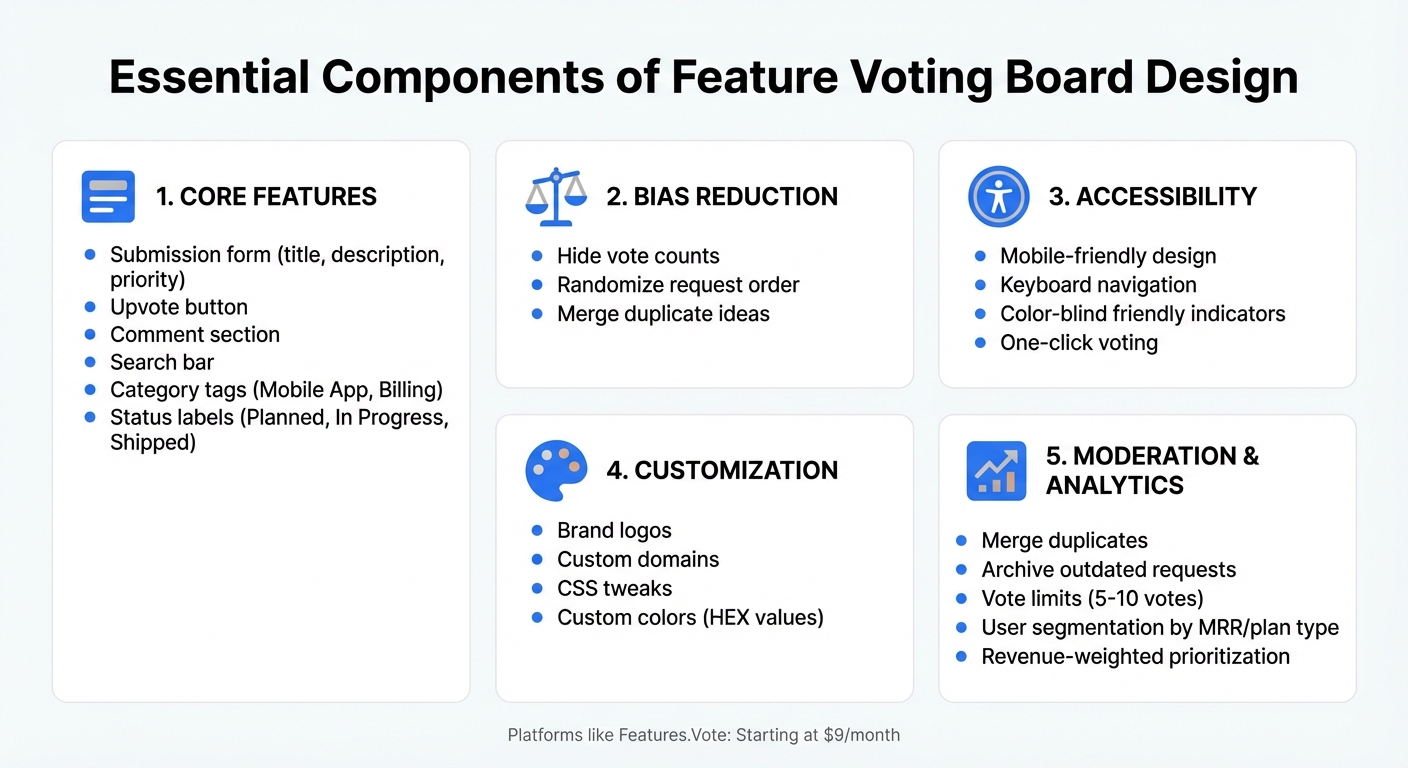
- Core Features: Include submission forms, upvote buttons, comment sections, search bars, and category tags. Add status labels (e.g., "In Progress") to manage expectations.
- Bias Reduction: Hide vote counts, randomize request order, and merge duplicate ideas to focus on meaningful feedback.
- Accessibility: Use mobile-friendly designs, keyboard navigation, and color-blind-friendly indicators to maximize participation.
- Customization: Add branding elements like logos, custom domains, and CSS tweaks to match your product's identity.
- Moderation & Analytics: Use tools to merge duplicates, archive outdated requests, limit votes, and segment feedback by customer value or revenue impact.
Platforms like Features.Vote offer tools for creating public boards, roadmaps, and changelogs, with plans starting at $9/month. By centralizing and analyzing feedback, you can make informed product decisions that resonate with your users.
Core Components of Feature Voting Board Design
Creating a centralized voting board is a great way to streamline feedback, but its success depends on a few key elements. Without these, feedback can become scattered, and user participation may drop.
Key Features Every Board Needs
Start with a submission form that captures essential details like a title, description, and priority level (e.g., "Nice to Have" vs. "Must Have") [2][1]. Add an upvote button and a comment section so users can share their thoughts or expand on ideas [1][4].
To keep things organized, include navigation tools like a search bar to avoid duplicate entries, category tags (e.g., "Mobile App", "Billing") for better sorting, and clear status labels (e.g., "Planned", "In Progress") to manage expectations [2][5][3].
Bias-reducing features are also a smart addition. Consider hiding vote counts and randomizing the order of requests to prevent herd behavior. Moderation tools are equally important - they help you merge duplicate ideas, refine titles, and archive outdated suggestions [2][4][3][1][5].
Prioritizing Visual Clarity
A simple, well-organized layout can make a big difference in user engagement [5]. To minimize bias, randomize the order of requests and hide vote counts until after users have voted [2][4]. Use clear status labels with distinct visual markers to show progress and build trust [5].
Organizing posts with category tags and consolidating duplicate requests ensures votes are focused where they matter most. This gives your product team a better understanding of what users truly need [1].
Accessibility Matters
An accessible design ensures everyone can contribute their feedback. Use color-blind friendly indicators by pairing colors with shapes or text for status labels [6]. Make sure the board is mobile-responsive, supports keyboard navigation, and allows one-click voting or participation without requiring users to log in [1][5]. These inclusive features help gather a broader range of input, leading to more balanced decisions [1].
How to Organize and Customize Your Board
Content Organization Methods
Start by centralizing feedback to keep your board practical and effective. Gather input from email, Slack, and support tickets in one place instead of letting it scatter across multiple tools [5]. This way, you’ll avoid fragmented data and get a clearer view of what users genuinely want.
Once your feedback is centralized, focus on merging duplicates. This step helps maintain a clean board and ensures vote counts accurately reflect user demand [1][7]. If similar ideas are spread across multiple posts, it dilutes the signal for popular features. Dedicate time each week to combine requests that describe the same concept.
Next, use categorization and filtering to make it easy for users to find relevant suggestions. Tags like "Mobile App", "Billing", or "Integrations" can group related ideas [7][2]. Allow users to sort suggestions by popularity, recency, or alphabetically to reduce bias [2]. For internal use, segment feedback by customer attributes like monthly recurring revenue or plan type, so you can prioritize input from high-value accounts over raw vote counts [1]. After organizing the content, you can move on to customizing your board for branding and user accessibility.
Finally, status transparency is key to building trust. Use labels like "Under Consideration", "Planned", "Shipped", or "Not Planned" to show progress and set clear expectations [1][5].
Customization Options
Visual branding ensures your board feels like a natural extension of your product. Add your company logo, apply your brand’s HEX color values to the navigation bar, and upload a custom favicon [8]. For more advanced tweaks, custom CSS lets you adjust fonts, element sizes, and even add background images [9].
To keep users within your ecosystem, consider custom domains and embedding. Hosting the board on a custom domain maintains a seamless and branded experience [8][1]. This approach helps reduce user confusion and aligns the board with your overall product design [8].
Lastly, access control lets you decide who can view or interact with your board. Public boards encourage community feedback, while password protection or SSO is ideal for internal or beta feedback [7][5]. You can also remove "Powered by" labels for a fully branded experience [8][5].
Managing Feedback with Moderation and Analytics
Moderation Tools for Quality Control
Keeping feedback organized and actionable is crucial. Start by filtering meaningful suggestions from the noise. This includes merging duplicate ideas and splitting up combined requests. For instance, if someone suggests, "Add PDF export and change the color", break it into two separate requests to ensure clarity in tracking votes [10].
Vote limits can help users focus on what matters most. Without these caps, feedback boards can turn into endless wish lists. By restricting users to five or ten votes, they’re forced to prioritize their top needs. Additionally, archiving outdated requests - those that haven’t gained traction after a year or two - keeps the board relevant and manageable [1][5].
Allowing comments adds depth to the feedback. Numbers alone don’t tell the whole story, but comments let users explain why they need a feature. For example, Mercury’s product team used comments to uncover patterns, realizing that a single support ticket often represented the needs of 20 to 30 other users [1][12].
Once feedback is well-organized, the next step is leveraging analytics to connect user input with your business goals.
Using Analytics to Guide Decisions
Analytics help you prioritize feedback based on its impact. User segmentation is a powerful tool for identifying which requests come from your most valuable customers. By segmenting feedback by factors like plan type, company size, or monthly recurring revenue (MRR), you can ensure your roadmap reflects the needs of key accounts rather than just the loudest voices [1][11].
Another approach is revenue-weighted prioritization, which ties voting data to metrics like MRR or deal value. This method balances popularity with business impact. In 2022, GiveButter used this strategy to launch their "Auctions" feature, which had over 600 votes. Jesse Sandala, their Director of Product, shared:
"We assigned the effort score and strategic importance to achieve a more balanced ranking for our roadmap" [1].
To avoid biases, consider randomizing or alphabetizing the feedback board [2][5]. Analytics also help in managing expectations - marking features as "Not Planned" with a short explanation ensures transparency and prevents requests from lingering indefinitely [5][12].
sbb-itb-87ea67c
Features.Vote Tools for Building Better Boards
Customization and Integration Options
Features.Vote combines three essential tools: Public Feedback Boards to gather ideas, Roadmaps to track progress (Planned, In Progress, Done), and Changelogs to share updates about new releases. It works seamlessly with web frameworks, mobile apps, and Shopify stores, making it a versatile solution for businesses [13].
The integration process is quick - taking less than a minute. For instance, Alexandre Negrel from Prisme Analytics and Andrew P. from PullNotifier successfully embedded Features.Vote boards into their platforms. They used it to manage requests like "Add WordPress plugin" and monitor user retention, enabling them to prioritize and develop features more efficiently [13].
The platform also offers dark mode, custom domains, and the option to remove "Powered by" branding on higher-tier plans. Boards can be embedded as modals, sidebars, or full-page displays with minimal coding. For added flexibility, private boards are available for internal teams or restricted groups, while public boards engage a broader audience. These customization options, paired with easy integration, pave the way for valuable analytics that can guide product development decisions.
Analytics and Reporting Tools
Features.Vote provides detailed insights by tracking upvotes to measure feature demand and using status labels like "Approved" or "Pending" to show progress [14]. Advanced tools, such as user segmentation and Total Voter Spend tracking, help prioritize features based on revenue impact rather than just popularity. Public dashboards enable transparent sharing of feedback data with stakeholders, while automated email notifications keep users updated when their requested features are implemented [13]. These analytics and reporting tools ensure businesses can make data-driven decisions and maintain clear communication with their users.
Pricing Plans for Different Business Sizes
Features.Vote offers a 14-day free trial with no credit card required. After that, businesses can choose from two main plans:
- Lite Plan: Priced at 90/year), it includes 1 project, a public voting board, a public roadmap, email notifications, and moderation tools.
- Growth Plan: At 290/year), this plan is designed for growing teams, offering unlimited projects, advanced analytics, user segmentation, private boards, public changelogs, custom domains, and the option to hide branding [13].
For non-technical users, a one-time setup service is available starting at $99. Over 1,000 businesses already rely on Features.Vote [13]. Heather Paunet, VP of Product Management at Untangle, shared her experience:
"For the functionality we're looking for - a simple feedback community - the features we get are actually better than I expected and at a price that we can afford" [5].
Conclusion
A thoughtfully designed feature voting board can be a game-changer for making informed, data-driven decisions in product development. By turning user feedback into actionable insights, you ensure your roadmap aligns with real user needs instead of guesswork.
Here’s what matters most: treat votes as just one piece of the puzzle, prioritize feedback based on customer value, keep users updated when their requests are implemented, and regularly moderate your board to maintain clarity. With Features.Vote, organizing and prioritizing scattered feedback becomes seamless. The platform provides public feedback boards, roadmaps, and changelogs that can be set up in minutes. It also delivers the customization, analytics, and moderation tools you need to turn feedback into meaningful action.
Whether you’re a solo entrepreneur or part of a larger team, Features.Vote offers flexible pricing to fit your needs. Start for free, or upgrade to the Lite Plan for 29/month. It’s an easy way to keep users engaged while ensuring your roadmap reflects what truly matters to them.
FAQs
::: faq
How can I minimize bias when using a feature voting board?
To reduce bias on a feature voting board, start by establishing clear, objective criteria for evaluating submissions. For instance, assess features based on how well they align with business goals, their potential to generate revenue, or their impact on the user experience. Displaying these criteria prominently on the board helps voters evaluate ideas consistently and ensures irrelevant suggestions are filtered out.
Another important step is to balance voting power and anonymize votes to prevent any individual or group from dominating the process. You could assign weighted votes to experts or key stakeholders while keeping the majority of votes equal. Anonymizing voter identities further shifts the focus to the quality of the ideas rather than who proposed them. Additionally, limiting the number of votes per user and segmenting voters by roles or usage patterns can help capture a wider range of perspectives.
Tools like Features.Vote can streamline these efforts by offering features such as custom scoring systems, weighted voting options, and anonymous submissions. These functionalities make it easier to gather unbiased and actionable feedback from your audience. :::
::: faq
What are the advantages of using status labels on a feature voting board?
Status labels turn a jumble of ideas into a clear, structured roadmap. Labels like “Under consideration,” “Planned,” “In progress,” and “Done” give users a straightforward view of where each suggestion stands. This transparency not only keeps users in the loop but also helps build trust by showing them exactly how their feedback is being handled.
These labels also make navigation a breeze. They provide quick, visual cues that let users scan the board and instantly grasp the progress of different items. Want to focus on specific updates? Users can filter by statuses like “Planned” or “In testing” to zero in on what matters most to them. Adding optional descriptions to these labels takes it a step further, offering extra clarity without overcrowding the interface.
With Features.Vote, you can take it a notch higher by creating custom status labels that fit your workflow perfectly. This ensures everyone - whether customers, product managers, or developers - stays on the same page when it comes to tracking feature requests. :::
::: faq
How does user segmentation improve product development decisions?
User segmentation takes voting data to the next level by breaking it down into meaningful groups based on factors like user role, industry, or subscription tier. This method shifts the focus from just counting how many users want a feature to understanding who is asking for it. This way, decisions aren't just about popularity but about strategic alignment.
By diving into these segments, product teams can prioritize features that truly matter to their most valuable or strategically important users. It also helps them spot overlooked opportunities, like niche requests from specific customer groups, while scaling back on less impactful ideas. Tools such as Features.Vote make this process even easier by letting you tag and filter votes by segment, ensuring every decision reflects the unique needs of different user groups.
The result? Resources are used more effectively, ROI improves, and customer satisfaction gets a boost. Plus, it keeps your product roadmap transparent and aligned with the priorities of key segments. :::